
Mendeley: The Ultimate Research & Reference Manager for Students, Researchers, and Academics

Managing research papers, keeping track of citations, and organising academic sources can quickly become overwhelming for students. Whether you're writing your first university essay or preparing a full dissertation, the process of collecting, reading, and referencing academic material often becomes more time‑consuming than the writing itself.
Mendeley is a powerful, student‑friendly reference manager designed to simplify academic research from start to finish. With millions of users worldwide, Mendeley has become a staple tool for students, researchers, and academics who want to stay organised, save time, and write with confidence.
In this review, we’ll explore what makes Mendeley such a valuable tool for students, how it compares to other reference managers, and why it remains one of the most trusted platforms for academic success.
What Is Mendeley? A Complete Overview
Mendeley is a reference manager, academic social network, and research organisation tool owned by Elsevier. It allows students and researchers to:
- Collect academic papers
- Organise research libraries
- Highlight and annotate PDFs
- Generate citations and bibliographies
- Sync research across devices
- Collaborate with peers
- Discover new research
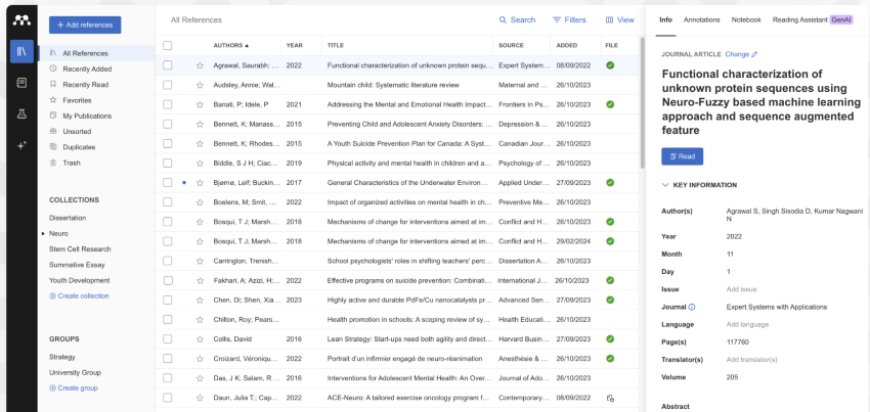
At its core, Mendeley solves one of the biggest problems students face: keeping research organised and accessible. Instead of juggling dozens of PDFs across folders, tabs, and devices, Mendeley centralises everything into one clean, searchable library.
Why Mendeley Matters for Students
University students deal with a constant flow of academic material:
- Journal articles
- PDFs from lecturers
- E‑books
- Research papers
- Websites
- Reports
- Case studies
Without a proper system, these quickly become unmanageable.
Mendeley gives students a structured, intuitive way to store, categorise, and cite all their sources, making it easier to focus on writing rather than administrative tasks.
Key reasons students love Mendeley:
- It saves hours on referencing
- It keeps research libraries organised
- It works across laptops, tablets, and mobile devices
- It integrates directly with Microsoft Word
- It’s free to start
- It supports all major citation styles
For students writing essays, lab reports, dissertations, or theses, Mendeley becomes an essential part of their academic workflow.
Mendeley’s Core Features
Let’s break down the features that make Mendeley so powerful.
1. Reference Manager: Your Research Library, Organised
The reference manager is the heart of Mendeley. You can import PDFs, drag‑and‑drop files, or save papers directly from your browser using the Mendeley Web Importer. Mendeley automatically extracts metadata such as:
- Title
- Authors
- Publication year
- Journal name
- DOI
This means you don’t have to manually type in citation details — a huge time saver.
Organisational tools include:
- Folders and subfolders
- Tags
- Notes
- Starred items
- Search and filtering
For students working on multiple modules or a dissertation, this structure is invaluable.
2. PDF Reader & Annotation Tools
Mendeley includes a built‑in PDF reader that allows you to:
- Highlight text
- Add sticky notes
- Annotate margins
- Bookmark pages
- Search within PDFs
All annotations sync across devices, so you can start reading on your laptop and continue on your tablet without losing your place.
This makes Mendeley a powerful study tool, not just a reference manager.
3. Mendeley Cite: Automatic Citations in Microsoft Word
Referencing is one of the most frustrating parts of academic writing.
Mendeley Cite solves this by integrating directly into Microsoft Word.
With one click, you can:
- Insert citations
- Change citation styles
- Generate a bibliography
- Update references automatically
- APA
- MLA
- Chicago
- Harvard
- Vancouver
- And hundreds more
This feature alone can save students hours on every assignment.
4. Cloud Sync Across All Devices
Mendeley syncs your entire library across:
- Windows
- macOS
- iOS
- Android
- Web
This means your research is always accessible, whether you're in the library, on the bus, or studying at home.
5. Collaboration Tools
Group projects are a big part of university life.
Mendeley supports collaboration through shared libraries where students can:
- Share PDFs
- Annotate together
- Exchange notes
- Work on the same research collection
This is especially useful for lab groups, dissertation partners, or study teams.
6. Research Discovery
Mendeley also includes a research discovery feature that recommends papers based on your interests.
This helps students:
- Find relevant sources faster
- Stay updated on new research
- Explore related topics
- For dissertation students, this is a huge advantage.
How Mendeley Improves the Student Workflow
Let’s walk through how a typical student uses Mendeley from start to finish.
Step 1: Collecting Sources
You find a journal article online.
Instead of downloading it and losing it in your “Downloads” folder, you click the Mendeley Web Importer.
The paper is instantly saved to your library with full citation details.
Step 2: Reading & Annotating
You open the PDF inside Mendeley and highlight key sections.
You add notes summarising important arguments or quotes.
Step 3: Organising Research
You drag the paper into your “Dissertation” folder and tag it with keywords like:
- “Methodology”
- “Literature review”
- “Case study”
Step 4: Writing Your Assignment
In Microsoft Word, you open Mendeley Cite.
As you write, you insert citations with one click.
Step 5: Generating the Bibliography
When you’re done writing, you click “Insert Bibliography.”
Mendeley automatically formats everything in the correct citation style.
Step 6: Submitting Your Work
Your references are clean, accurate, and professionally formatted — without hours of manual editing.
Mendeley vs. Other Reference Managers
Students often compare Mendeley to tools like Zotero or EndNote.
Here’s how Mendeley stands out:
Strengths
- Best‑in‑class PDF annotation
- Clean, modern interface
- Excellent Word integration
- Strong cloud sync
- Great for STEM and research‑heavy fields
- Free to start
Ideal for:
- Undergraduate students
- Master’s students
- PhD researchers
- Lab groups
- Dissertation writers
While Zotero is great for the humanities and EndNote is popular in professional research, Mendeley strikes the perfect balance for students who want power, simplicity, and speed.
Pricing & Student Discounts
Mendeley offers a generous free plan that includes:
- Reference manager
- PDF reader
- Cloud sync
- Citation tools
- Web importer
- Mobile apps
Paid plans offer additional storage, but most students never need to upgrade.
This makes Mendeley one of the most accessible academic tools available.
Who Should Use Mendeley?
Mendeley is ideal for students in:
- Medicine
- Engineering
- Psychology
- Business
- Law
- Social sciences
- Humanities
- Computer science
- Biology
- Chemistry
If your degree involves reading academic papers or writing research‑based assignments, Mendeley will save you time and improve your workflow.
Where to Download Mendeley
Students can download Mendeley directly from the official website:
Discover More Tools Like Mendeley on Instuly Network
Instuly curates the best tools, software, and digital products for students.
Explore more productivity and study tools here:
Earn Money Promoting Tools Like Mendeley
If you're a student creator, influencer, or ambassador, you can earn commissions by promoting student‑focused tools through the Instuly Affiliate Network.
Share your unique link
Earn commissions on every sale
Perfect for study creators and campus ambassadors
👉 https://my.instuly.com/register
Is Mendeley Worth It for Students?
Absolutely.
Mendeley remains one of the most powerful, reliable, and student‑friendly reference managers available today.
With its combination of:
- Automatic citation generation
- Clean research organisation
- Powerful PDF annotation
- Cloud sync
- Collaboration tools
- Free access
…it’s hard to find a better tool for academic success.
Whether you're writing your first university essay or preparing a full dissertation, Mendeley will help you stay organised, save time, and write with confidence.

Instuly is the go-to website to discover side hustle ideas, tech and marketing skills, and ways to earn money as a student.